
Manufacturing testing, re-engineered for production
A platform-independent automated test engine designed for PCBA and final acceptance testing in real factory environments. Replace heavy LabVIEW-style stacks with a lightweight, structured, reusable runner: faster script development, consistent operator execution, and controlled maintenance tools.
Script-driven execution, built for technicians
Tests are defined as a structured step table (Step Name, Comm Label, Command, Min/Max, Returned, Result, Log). The engine dispatches steps to the correct adapter, captures Returned values, evaluates limits, and generates filtered reports (Log / Full / Fail).
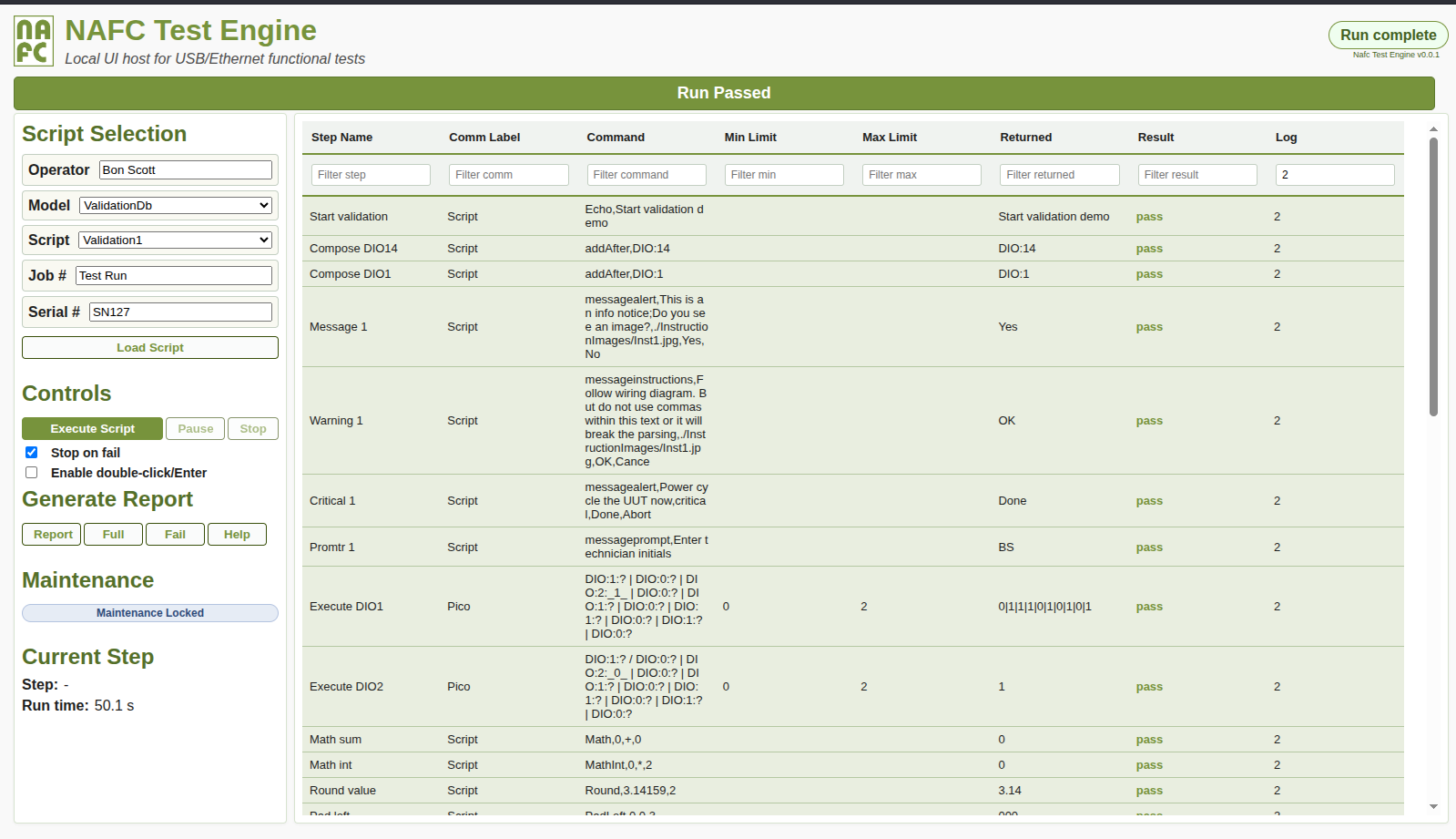
Operator-focused UI
Clear pass/fail state, prompts/alerts/instructions with images, maintenance lock for controlled edits, and reports for traceability.
Core capabilities
Designed around production constraints: repeatability, controlled change, low false-fail risk, and maintainability.
Device adapters
Serial/COM/USB, Ethernet GET/POST + raw payload, and Windows DLL integration for vendor APIs.
- Auto-find device profiles by command/expected response
- Host/port stored in profile for concise commands
- Vendor drivers via configured DLL entry point + calling convention
Scriptable logic (no programming)
Table-driven execution with swaps, cascades, branching, jumps, delays, and inline reporting.
<Step Name>swaps Returned values[Step Name]swaps result state for flow control- Chain commands with
|or/; reuse_index_outputs
Manufacturing-ready logging
Log filtering, stop-on-fail, troubleshooting mode, and report generation.
- Log/Full/Fail report views
- Hidden background steps (Log 0/1) with failure visibility
- Post-EndScript actions for autosave/print/custom logging
Execution workflow
Simple operator flow, predictable backend dispatch.
Operator flow
- Select Model/Script, enter Job + Serial, then Run.
- Engine executes each step: send → Returned → limits → Result.
- Dialogs appear when required (instructions/photos, prompts, confirmations).
- Stop-on-fail halts on first failing limit; single-step available for troubleshooting.
Backend dispatch (summary)
- Comm Label resolves to adapter (Script/Serial/Ethernet/DLL).
- Cascaded commands execute in order;
_index_reuses prior results. - Runs logged + reports generated by filter (Log/Full/Fail).
- Maintenance lock controls editing access on the factory floor.
Integration notes
Practical connectivity patterns for real devices.
USB / Serial (COM)
- Works directly with virtual COM ports exposed by vendor drivers.
- Auto-find profiles bind the correct device using ID/expect matching.
- Use send-only commands via a “fire” style when no response is required.
Ethernet
- GET/POST and raw payload styles supported.
- Store host/port in the profile; keep commands concise in scripts.
- Prefer IPv4 endpoints for consistent resolution.
Windows DLL adapters
- Bridge to vendor APIs without writing custom code.
- Configure DLL path, function name, calling convention, return type.
- Supports both virtual COM and vendor-supplied DLL APIs.
Fixtures + UI
Fixtures are part of a complete system: robust harnessing, clear operator indicators, and scripts that include wiring/setup guidance. See the dedicated fixture page for the design approach.
Contact / Demo
Ready to change how you perform final verification and acceptance testing?
What we’ll cover in a demo
- Script table model + comm label device profiles
- Operator dialogs with images + maintenance lock
- Stop-on-fail + single-step troubleshooting
- Report generation (Log/Full/Fail)
- Fixture integration: wiring instructions + prompts